JQuery

W3 Schools

Skill Up!

JQuery
Javascript is very powerful and there are endless things that you can do with it. Check out some of these websites that use Javascript. AMAZING! If you enjoy programming, there is almost nothing you can't do with Javscript!
Lately, a lot of Web Designers have been using JQuery. It is a set of Javascript libraries that have been developed to make it a little easier for Web Designers to make their websites engaging and interactive with Javascript. Now that you know a little bit of Javascript and you are familiar with the idea of functions and variables, let's take a peek at JQuery.

Focus 1 - Getting ready

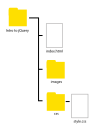
As we get started with jQuery, let's create an organised project environment. On your computer, set up the following folder system:

Note

  1. There is a main project folder called Intro to jQuery.
  2. There are 2 subfolders: images and css
  3. In the main folder, there is a file called index.html
  4. In the css folder there is a file called style.css

Use your text editor eg Notpad++ to create the html file and the css file.

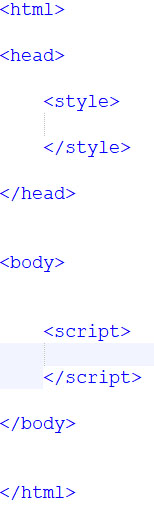
Open index.html in your text editor and type up the basic structure of a webpage.

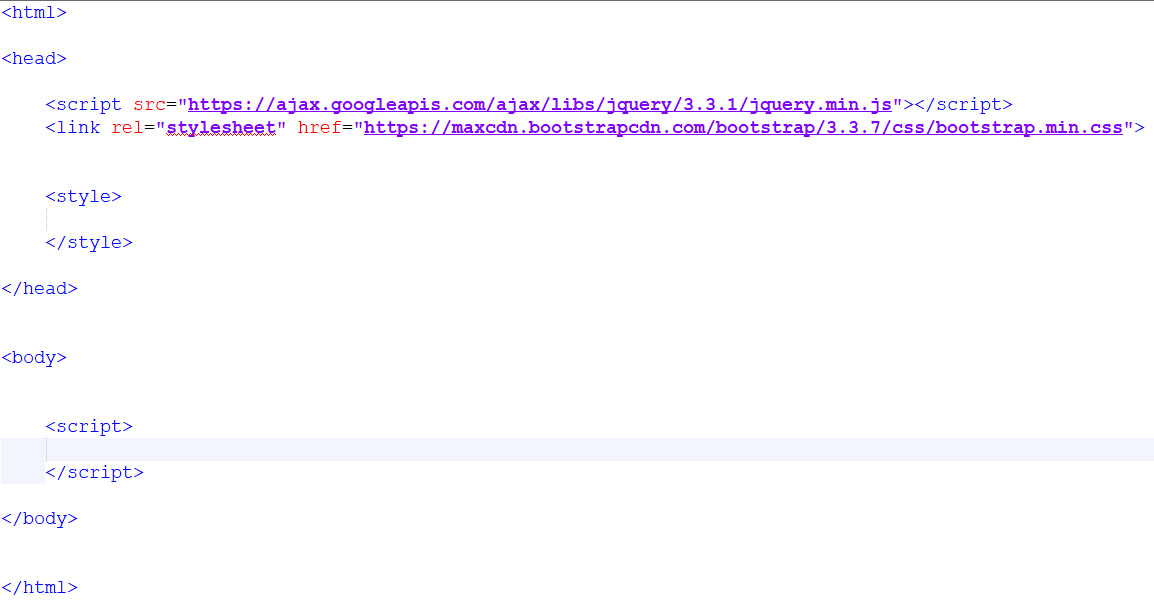
We need to get a link to an online resource: JQuery's javascript file. If we can find it, we can use jQuery in our project.

The link code looks something like this:

There are many places on the internet to get this link. I usually go to W3 School's JQUERY Getting Started section and copy the CDN code into the head section of my webpage.

Make sure you use a CDN link!

Let's also copy Bootstrap's css CDN link into the head section of our webpage.

I usually go to W3 School's Bootstrap Getting Started section and copy the CDN code into the head section of my webpage.

Make sure you use a CDN link!

Now that we have a link to jQuery's Javascript file and Bootstrap's CSS file, we can get started!

If you want to watch a video of how to set up your project environment, watch this short intro video.

Focus 2 - setting up jQuery

Focus 3 - Chaining